Every sprint, someone has to sit down and turn a stack of user stories and acceptance criteria into structured test cases. It is necessary work, but it is also repetitive, and repetitive work is exactly where AI tools tend to earn their keep.
Over the past several sprints on a client-facing application I support, I built a small workflow on Azure that uses AI to draft the first pass of test cases directly from our Azure DevOps work items. Here is how it works, why we built it this way, and where the time savings actually showed up.
The Problem
Writing test cases from scratch takes longer than it should. The individual pieces are usually straightforward; you already know what the happy path looks like and can guess at a handful of edge cases. What eats the time is translating acceptance criteria into clearly written steps, expected results, and preconditions, sprint after sprint. Multiply that by every story in a sprint, and testers end up spending a large share of their time on formatting and phrasing rather than on actually thinking about what could break.
There is also a consistency problem. When different people write test cases for similar features, the structure, level of detail, and naming conventions drift. That makes cases harder to scan later and harder to maintain.
The Business Problem
The team was losing consistent time every sprint to test case authoring, and that time competed directly with exploratory testing and actual defect hunting. The goal was not to remove people from testing. It was to stop spending senior tester time on a task that mostly involves reading a requirement and writing it back out in a structured format.
The Approach
Because our work items already live in Azure DevOps, and our client’s data and infrastructure sit on Azure, the natural approach was to build the workflow entirely on Azure rather than bolt on a separate third-party tool. The full flow looks like this:
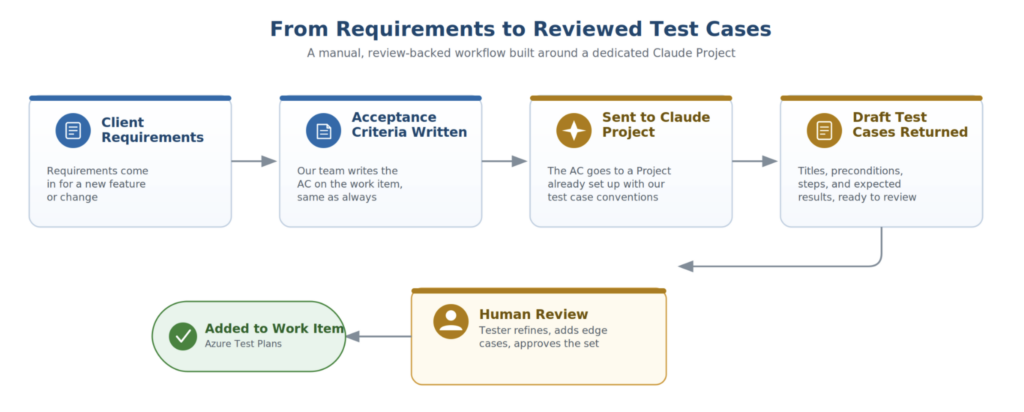
An Azure Function is triggered when a work item reaches a defined state on the sprint board. The function retrieves the work item fields, acceptance criteria, and any linked design notes via the Azure DevOps REST API, then assembles a prompt and sends it to Claude, which is deployed through Azure AI Foundry’s model catalog. That keeps the workflow on our standard model while still running the call through Azure infrastructure, authentication, and governance.
The model returns a structured draft, test title, preconditions, numbered steps, and expected results, formatted to match our team’s existing test case template. That draft is written back into Azure Test Plans as a new test case, linked to the originating work item, and flagged as pending review so it never gets mistaken for a finished, reviewer-approved case.
From there, a human reviewer opens the draft in Azure Test Plans like any other test case, corrects anything misunderstood about the requirement, and adds the edge cases only someone with domain context would know to test.
This is not “AI writes the tests, and we ship them.” It is closer to a first draft from a fast, tireless junior tester who has read the ticket carefully but has never actually used the product.
Where It Saves the Most Time
The biggest wins showed up in a few predictable places.
Boilerplate cases. Happy path scenarios, standard field validation, and common negative cases (empty fields, invalid formats, permission checks) are exactly the kind of thing AI drafts well on the first try. These are the cases that take the least thought but the most typing, so automating the first draft removes a lot of grunt work.
Consistency across similar features. When several stories in a sprint touch similar functionality, like different variations of a submission workflow, the AI tends to produce cases with a similar structure and level of detail across all of them. Before, that kind of consistency only happened when someone deliberately went back and matched the format and detail of earlier test cases by hand.
Catching gaps under time pressure. When a tester is moving quickly to meet a sprint deadline, it is easy to miss a minor case. Because the model works from the acceptance criteria directly rather than from memory or habit, it sometimes surfaces a case a rushed human would have skipped, like what happens when a related record is missing or in an unexpected state.
Where It Still Needs a Human
AI drafts are not a replacement for domain knowledge, and there are places where that becomes obvious quickly.
Edge cases that the AC does not spell out. Even well-written acceptance criteria cannot anticipate every situation a feature will run into in practice, especially edge cases tied to compliance, client-specific handling, or scenarios that only surfaced because of a past production issue. AI only knows what is written in the AC, it has no memory of the incident from eight months ago that led to a specific validation step existing. A human reviewer has to catch that gap and test for it. .
Deciding what actually matters. AI will happily generate a long list of possible test cases. It takes a human to decide which of those deserve deep, careful testing and which just need a quick pass, because not every path carries equal risk.
A Concrete Example
Take a feature that lets a user submit a request tied to a specific record, where that record might be in different states depending on outside factors. Figure 2 shows what the AI draft looked like next to the version after human review.
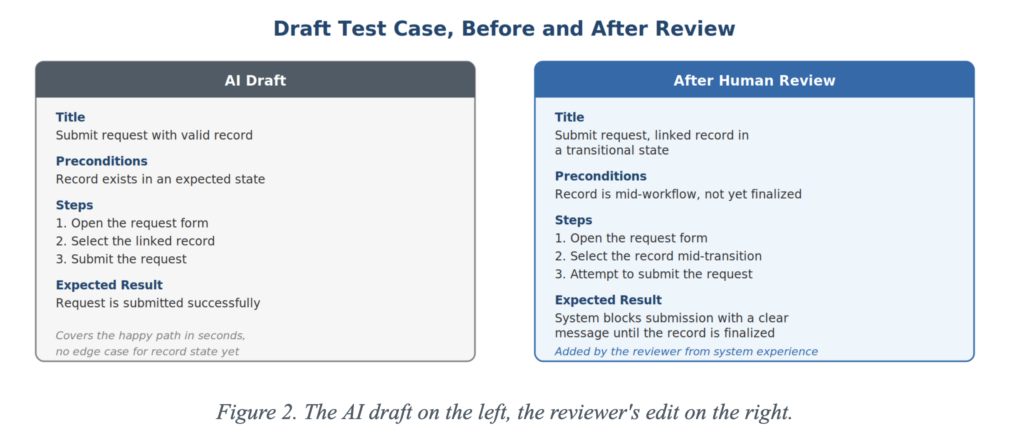
The draft covered the happy path and the obvious negative cases well. What it missed, and what the review added, was the case where the linked record was in an unusual or transitional state, something that only comes up because of how the workflow behaves in practice rather than how it is described in the ticket. That kind of gap is exactly where a reviewer’s experience with the actual system pays off.
The Productivity Payoff
The time saved per sprint has been real, though it shows up more in reallocation than in raw hours cut. Less time goes into writing and formatting boilerplate cases, and more time goes into the parts of testing that actually need a person: exploratory testing, hunting for edge cases tied to real business context, and reviewing the AI’s output critically instead of accepting it at face value.
The net effect is not “testing takes less effort.” It is “the effort goes to the parts of testing that were always the most valuable, and the parts that were mostly mechanical get automated.”
Takeaway
AI is not going to replace the judgment a tester builds up from actually knowing a system and its users. What it is good at is removing the friction between a written requirement and a first draft of test coverage, so the human on the other end spends their time reviewing and refining instead of starting from nothing. For teams under sprint pressure, that shift alone is worth the setup.